Getting Started With savvy
Installing savvy
Clone the github repo: https://github.com/houghb/savvy.git
In command line, enter the the savvy repo and run the command:
python setup.py install
This will install savvy on your machine so it can be called anywhere.
Installing required packages
In command line, enter the the savvy repo and run the command:
pip install -r requirements.txt
This will install the following packges required to run savvy:
- NumPy 1.10.4
- pandas 0.18.0
- Bokeh 0.11.1
- matplotlib 1.5.1
- ipywidgets 4.1.1
- Jupyter 1.0.0
- SALib 0.7.1 (To perform sensitivity analysis)
*graph-tool is excluded because it cannot be installed via pip install
Installing graph-tool (for mac)
Most of graph-tool’s features are implemented in C++, so it cannot be installed with a simple pip command. We have found it challenging to install on Windows machines, but relatively straightforward on OS X using Homebrew (shown here). For other options see https://graph-tool.skewed.de/download.
Using Homebrew in the command line, enter the following commands (these may take some time):
brew tap homebrew/science
brew install graph-tool
Quick Start Tutorial
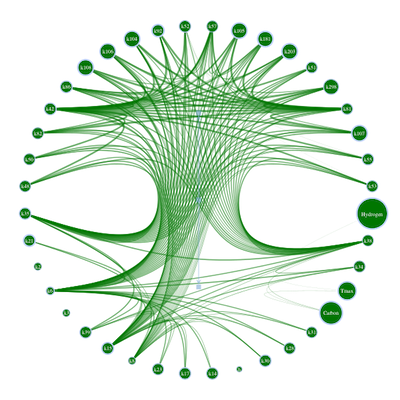
This is a quick start that generates a radial plot, heatmap, and network plot using sample datafiles. Run the following code from a Jupyter Notebook. Examples of these types of plots are shown below.
Alternatively, use the savvy_driver.ipynb in the repo to get started
right away.
All of the Bokeh plots (radial plot, bar chart, heat map) display additional information about sensitivity index values if you hover over them.
import copy

from bokeh.plotting import show, output_notebook
import os.path as op

import savvy
import savvy.data_processing as dp
import savvy.interactive_plots as ip
from savvy.plotting import make_plot, make_second_order_heatmap
import savvy.network_tools as nt

output_notebook()

# path to sample data files
# if you have sensitivity analysis results already, and their filenames
# start with the word "analysis", enter the path to their folder here.
path = op.join(savvy.__path__[0], 'sample_data_files/')

# process the data files and store their pandas dataframes in a dictionary
sa_dict = dp.get_sa_data(path)

# create interactive radial plots (or bar charts if few features)
# for ST and S1
ip.interact_with_plot_all_outputs(sa_dict)

# Plot heat maps of S2 indices for all your analysis files
# Plots for each file can be displayed by choosing the appropriate tab
# Note, if you have a model with many inputs, choosing a large value for
# `top` is computationally expensive.
ip.plot_all_second_order(sa_dict, top=5, mirror=True)

# Display a network plot of the second order interactions
# with first or total order sensitivity indices
# (set inline to false for an interactive window)
sa_dict_net = copy.deepcopy(sa_dict)
g = nt.build_graph(sa_dict_net['sample-output1'], sens='ST', top=40,
                   min_sens=0.01, edge_cutoff=0.0)
nt.plot_network_circle(g, inline=True)
Sample radial plot:

Sample heat map of second order indices:

Sample network plot showing total and second order indices: